Services

Start a project

PDFwright · PDF editor for Mac
Every PDF job. Paid for once.

Edit, sign, comment, organize, convert and protect PDFs on your Mac. Your files never leave your computer, and there’s no subscription.

  • One payment, no subscription
  • Up to 3 of your computers
  • Works offline
  • 30-day refund

Formerly PDF Master

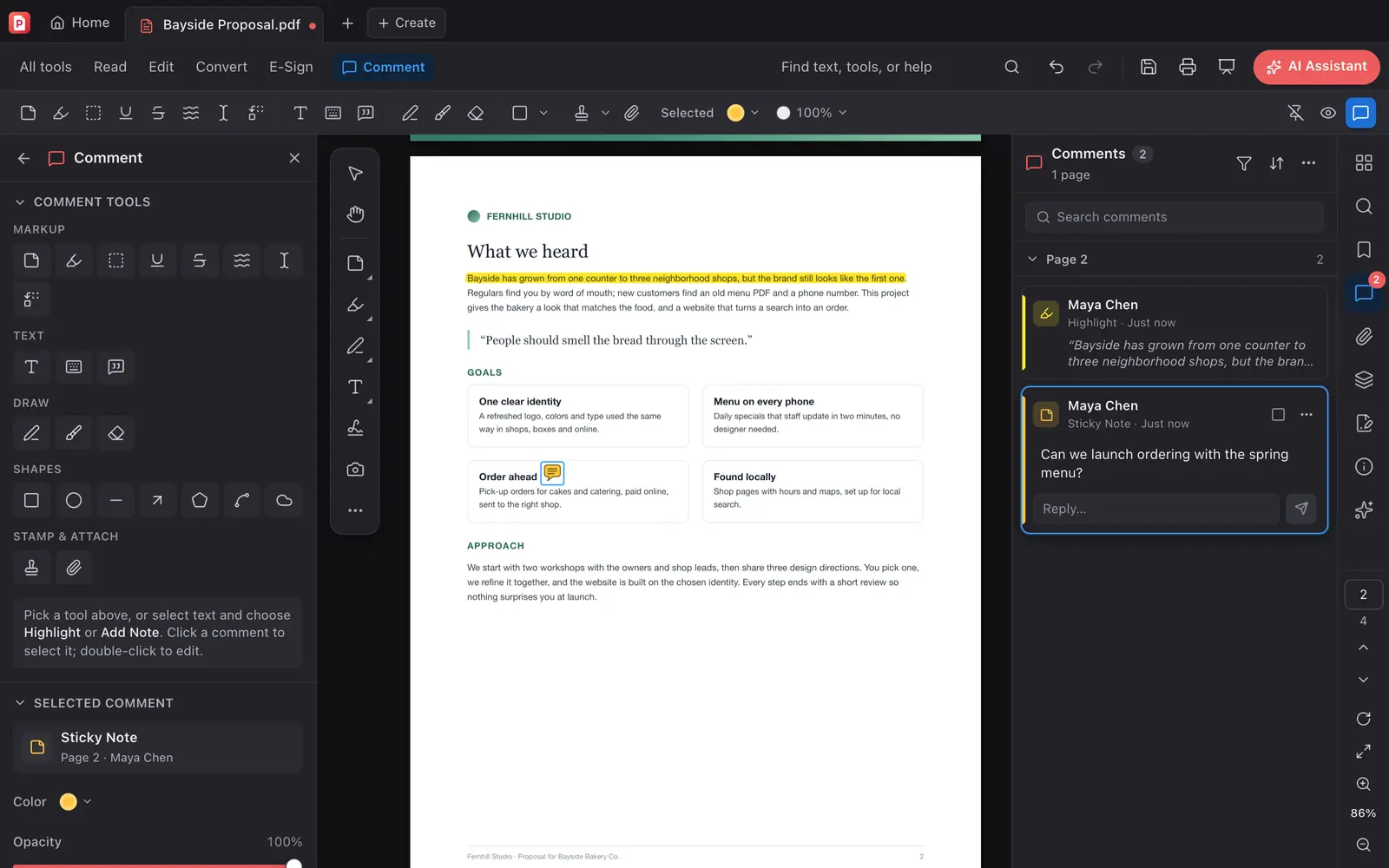
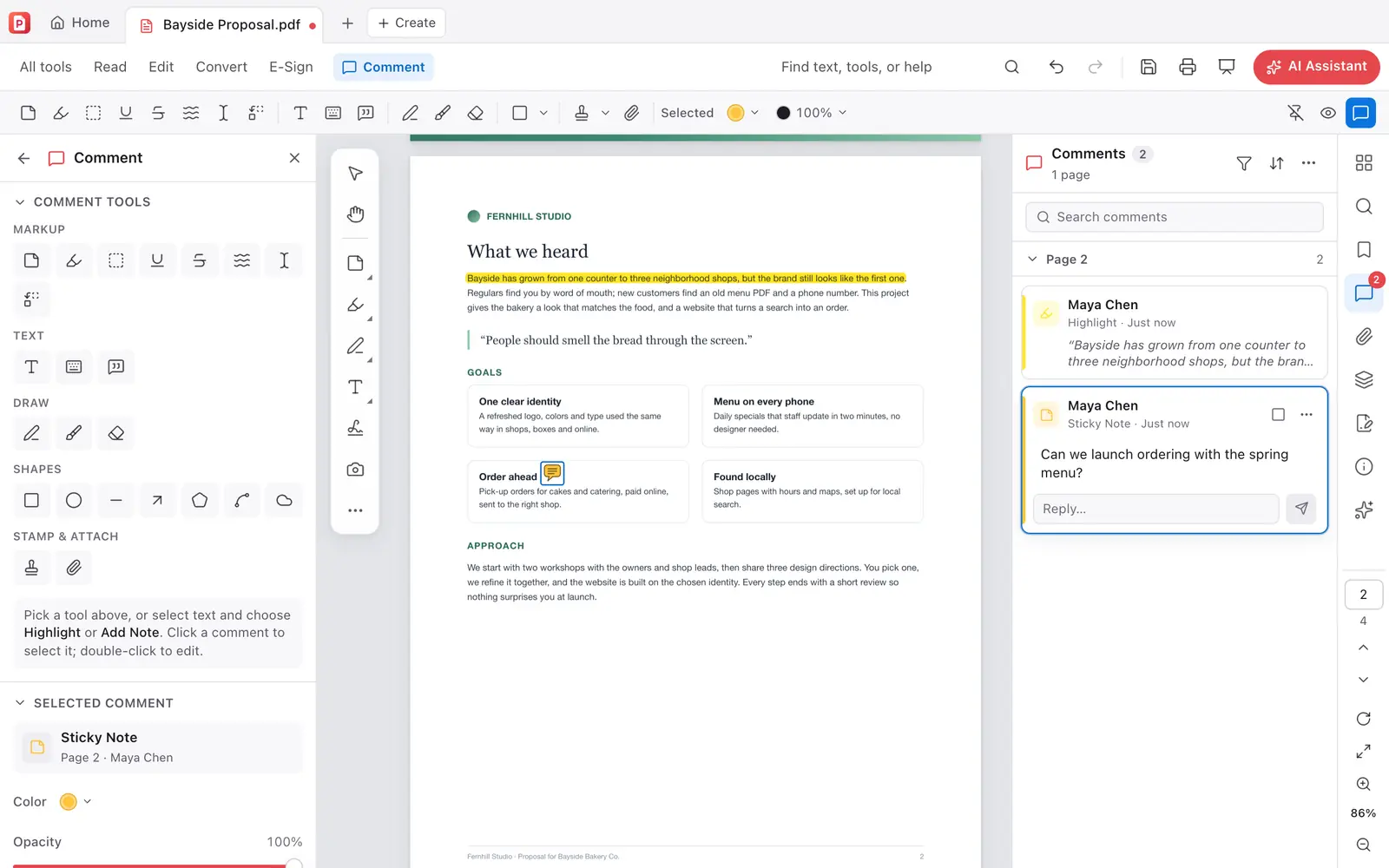
PDFwright with a proposal open: a highlighted sentence on the page, a sticky note, and both listed in the Comments panel on the right The same PDFwright window in dark mode: a highlighted sentence, a sticky note and the Comments panel
Real screenshot of PDFwright 1.5.0, light or dark to match your Mac.
  • Private by design

    Your documents are opened, edited and saved on your Mac. Nothing is uploaded.

  • Yours for good

    $199 once. No account, no monthly bill, no renewal date.

  • Every update included

    Every future version, for as long as PDFwright is made.

  • Open source

    Free software under the AGPL. Anyone can read the code.

What it does

The PDF tools you reach for, in one clean app.

Edit

Fix the text. Keep the layout.

Click a paragraph and type. PDFwright keeps the original font, size and spacing, and the text reflows inside its box, so a typo fix doesn’t mean redoing the document.

  • Change text and images in place
  • Add text boxes, pictures and links
  • Bold, colors, lists, alignment and spacing
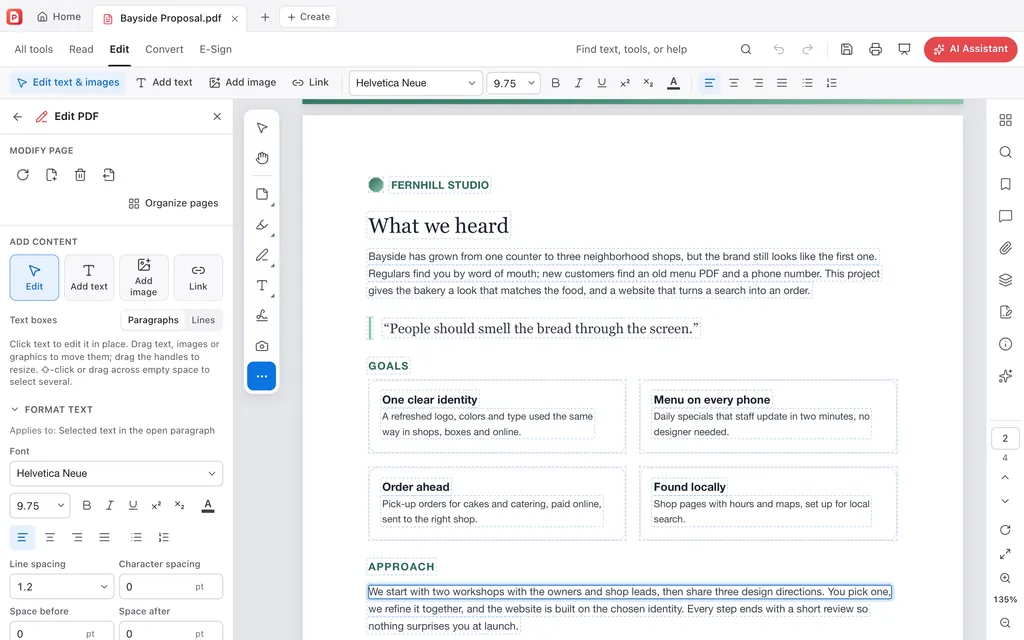
Editing a paragraph in PDFwright: every text box on the page is outlined, one is open for typing, and the format panel shows its font, size and spacing

Fill & sign

Sign a contract in under a minute.

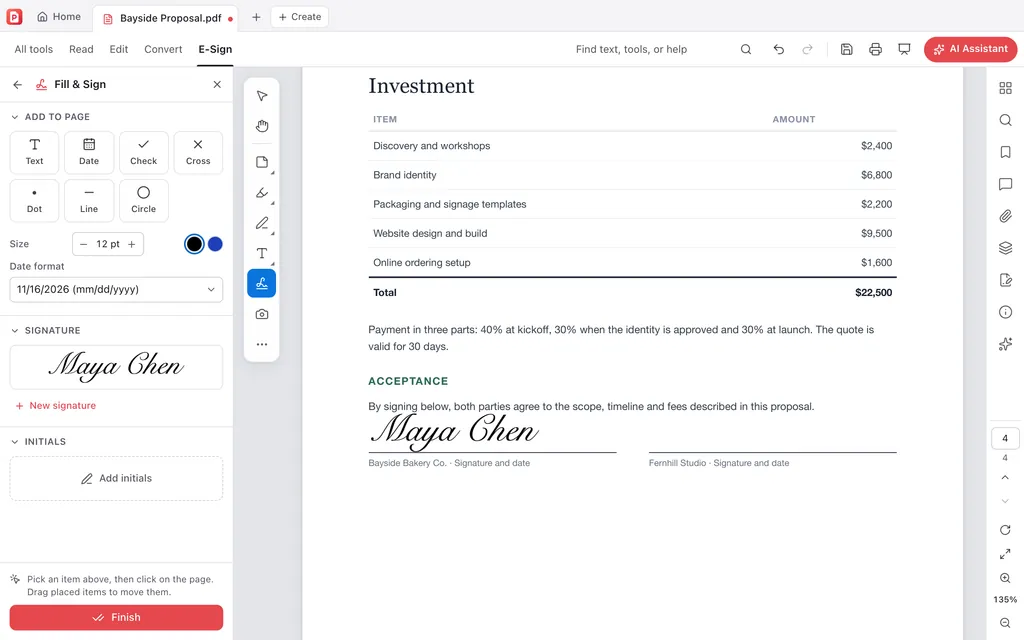
Open the PDF, click where it says sign, done. Type your name in a handwriting style, draw it, or use a picture of your signature. Fill in forms, add the date, ticks and initials too.

  • Typed, drawn or image signatures
  • Fill in fillable forms, or type on any page
  • Build your own fillable forms
Fill and Sign in PDFwright: a handwritten-style signature placed on the signature line at the end of a proposal

Organize

Every page in its place.

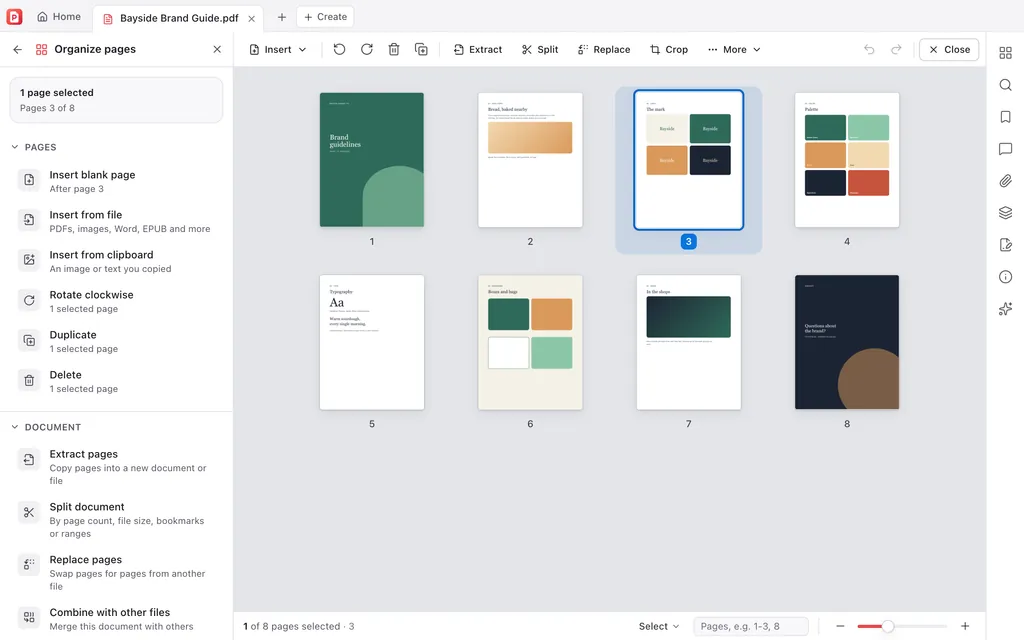
See the whole document as pages. Drag to reorder, rotate the sideways scan, delete the blank page, or pull a few pages out into their own file.

  • Reorder, rotate, insert and delete pages
  • Combine files, split one into several
  • Extract, replace, crop and number pages
Organize pages in PDFwright: an eight-page brand guide shown as a grid of page thumbnails, with page 3 selected

And the rest

Everything else, already included.

No add-ons, no “Pro” tier. Every tool is in the one app you buy.

  • Comments, highlights & stamps
  • Make scans searchable (OCR)
  • Convert to & from Word, Excel, PowerPoint
  • Redact for good
  • Passwords & permissions
  • Compress big files
  • Compare two versions
  • Watermarks, headers & footers
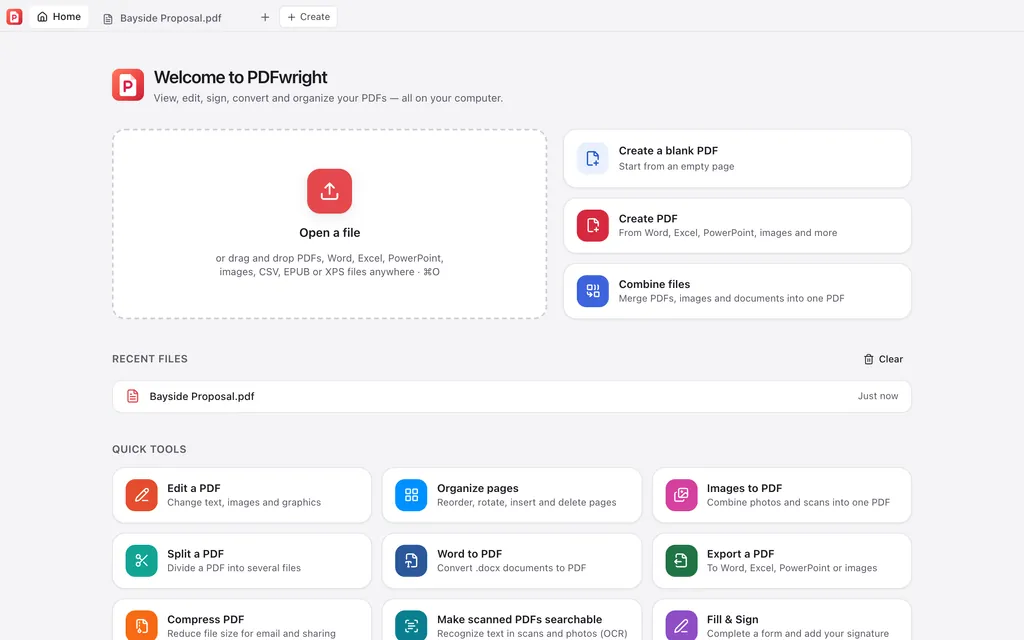
PDFwright's home screen: open a file, recent files, and quick tools such as Edit, Organize, Images to PDF, Split, Word to PDF, Export, Compress, OCR and Fill and Sign

Pay once vs. every month

Stop renting your PDF editor.

Most pro PDF editors are rented by the month. PDFwright costs $199 once, with every future version included. Put in what you pay for a PDF subscription today and see the difference.

a month
Subscription cost compared with PDFwright
AfterSubscriptionPDFwright
1 year$240$199
3 years$720$199
5 years$1,200$199

At $20 a month, PDFwright has paid for itself after 10 months.

$20 is only an example. Prices before tax.

Privacy

Your documents stay on your Mac.

Contracts, tax forms, medical letters: the files you edit in a PDF app are often the private ones. PDFwright never sends them anywhere.

  • No upload, no account

    Every tool runs on your computer. There’s nothing to sign up for.

  • Works offline

    The internet is used only to activate your key, to confirm it about once a week, and to check for updates. Offline it keeps working for 45 days between checks.

  • Redaction that really removes

    Redacted text is deleted from the file, not just covered with a black box.

  • AI only if you want it

    The optional AI assistant stays off unless you add your own Anthropic key.

Lifetime license

One price. Everything included.

Buy once and the key is yours: on the thank-you page right away, and by e-mail. Paste it into PDFwright and you’re done.

  • 1 Download PDFwright for Mac
  • 2 Buy a key (Stripe checkout)
  • 3 Help › License… › paste the key

Open source, honestly

What your $199 pays for.

PDFwright is free software under the GNU Affero General Public License, version 3 or later, because it is built on MuPDF, which is licensed that way. That means:

  • What you pay for is the license key, the updates and the support for the ready-made app.
  • You keep every right the AGPL gives you: to use, study, change and share the program and its source code. Buying does not take any of those away.
  • PDFwright comes with no warranty, as the AGPL says. Keep copies of important documents.

Written offer of the source code. For at least three years from the day you receive a version of PDFwright, anyone who has that version can get its complete corresponding source code at no charge. To ask for it, open a request titled “Source code request” and name the version (the download page and the installer’s file name show it). The same offer is in the app under Help › Source Code and License.

Questions

Before you buy.

Something not covered here? Ask me

What happens after I buy?

Your license key appears on the thank-you page as soon as you’ve paid, and it’s e-mailed to you too. Open PDFwright, choose Help › License… and paste the key. That’s it: no time limit.

Which computers does it run on?

Mac, both Apple silicon and Intel, with macOS 12 or newer. Windows and Linux versions are coming; the download page shows what’s ready for each system.

Can I use it on my laptop and my desktop?

Yes, on up to 3 of your own computers. To move it to a new one, choose Help › License › Deactivate this computer on the old one; that frees its seat.

Does it need the internet?

Only to activate the key, and about once a week to confirm it. Offline it keeps working for 45 days between confirmations. Your documents never leave your computer.

What is sent when the key is checked?

The key, a random number for this activation and your computer’s name (so you can tell your activations apart). Nothing about your documents.

Why does my Mac ask me to confirm the first time I open it?

The app isn’t signed with a paid Apple certificate yet, so macOS asks you to confirm once. The download page shows the exact clicks.

Will there be a subscription later?

No. This license is a one-time payment, with all future versions included.

Can I get a refund?

Try the full app free for 14 days first. Within 30 days of buying you can ask for a refund, for any reason, through the contact page; the key then stops working.

Is this the app that used to be called PDF Master?

Yes. PDFwright is the new name for PDF Master: the same app, made by the same person. Older versions in the list of all versions still carry the old name.

PDFwright lifetime license

$199 once. Every update after that is free.

Try the full app free for 14 days first. Use it on up to 3 of your own computers, with a 30-day refund if it isn’t right for you.

PDFwright is free software under the GNU AGPL v3 or later and uses MuPDF (© Artifex Software) and other open-source parts, listed in the app under Help › Third-Party Notices. Payments, sales tax and receipts are handled by Stripe. Questions? Contact me.

PDFwright $199 once · Mac

Buy